Since I am not currently in a school or library role, I do not have access to materials in this blog. Instead of creating a sound setup for my school, I took the information and research to make a plan for how to create a mobile sound setup. Ideally, classes or libraries that I work on French podcasts or other recording activities with would have their own sound setup. Practically speaking, it is unlikely that all schools in our district have this setup. It would therefore be helpful to create a mobile Sound Setup. I would follow the directions on the Elearning Brothers blog and allow for the panels to fold into themselves for easy transport.
As for a microphone, from basic research and reading of others’ responses it looks as though the Blue Snowball Ice microphone would be the best microphone for the price point. I would be hesitant to spend more since I could be using it with kids from elementary through to secondary school as well as transporting it, and I would not want to worry about it getting stolen or breaking.
I was already looking into microphones as we are doing several zoom-based cultural events in French classes, from zoom improv and theatre productions to author visits. The feedback I received from one author is that it is hard to hear students when they ask questions. A simple microphone could help create a more authentic exchange between our zoom guests and the students.
I chose to use Anchor for my podcast recording. While I spent time last summer and this week giving Garage Band a chance, I found it so much more complicated that Anchor. For the purposes of the typical classroom podcast, Garage Band is too advanced in my mind.
On the other hand, Anchor seems to be a podcast tool of choice for many educators. I have been using it since last summer and find it to be very accessible, user-friendly, and perfect for intro-level podcast recording students.
HERE is a link to my podcast, a book review of Kazuo Ishiguro’s new novel Klara and the Sun.
There are so many possibilities for podcasts in the language classroom, from final products for cross-curricular inquiry projects to theme-based group projects to providing an authentic task for students to interact and interview each other. While some teachers favour having a specific script, I really encourage students to have key ideas, language structures and vocab for each segment but to allow for some authentic conversation. This to me is what a real podcast should be, and also more closely mimics real conversations, which we are always trying to prepare our language students for.
My question for TLs and teachers is how can we help students to prepare for a podcast recording without them fully writing out a script? What scaffolds or structure can we offer to help students sketch out a podcast plan and consider what language structures and vocab they may need to be successful?
References
British Colombia Ministry of Education (2020) BC’s New Curriculum: Critical and
I chose to do a Screen Cast of my recent blog post about AI. Of all the topics we have covered, this one got me the most excited as it pushed my thinking about possibilities of technology to inspire and transform student learning and experiences.
In my current role as French Language Coordinator, I could use Screen Casting to record short webinars, explain how to access digital resources, how to navigate the French VLC, or other short tech tutorials.
I had to screen cast an entire course worth for UVic last fall. In addition to holding classes on zoom, I uploaded a short screen cast of lecture notes with a visual presentation. This was a requirement to meet the learning needs of a few students, but I did receive feedback that the posted videos were a useful tool for many. This reminded me that video supports may be essential inclusive practices for some students, but can benefit all (Bourgoin, 2017).
One thing I learned from this experience that I will take forward to any future screen casts for in my current role is to keep videos short. We are used to short snippits of information and students did not watch videos that were over 10 minutes. This was valuable feedback that I think can be applied to a TL context. For K-12 students, much shorter is even better.
For those TLs in a dual track school, are there any screen casts you would appreciate having at the ready in French from your language coordinator?
References
Bourgoin, R. & Arnett, K. (2017). Accès au succès. Pearson
Shane Koyczan’s (2014) illustrated reading of his poem Trolls provides a great demonstration of how visual media is a form of literacy. In this illustrated reading, the reader benefits from being read the poem out loud, as well as the illustrations that help tell the story and interpret the poem. Rather than the reader being left to interpret the poem on their own, they are given visual cues as to the writer’s interpretation. This visual support helps develop a student’s appreciation for poetry and interpret metaphors and meaning in text. What’s more, the visual support that accompanies the reading can even help with simply understanding the written text for students who struggle with reading comprehension in their first or additional language. Visual illustrations of written text are an inclusive strategy in the language learning classroom (Bourgoin, 2017).
Much like Koyczan’s illustrated and narrated poem, videos of songs can help students to understand, interpret and appreciate songs in the language classroom. While many teachers are making great use of music videos in the language classroom, there is so much more that can be done to take full advantage of this motivating medium for our second language learners. Sharing examples of how to use music videos in the language classroom with teachers could be a great way to further our understanding of how to integrate this media into our teaching.
One example of a music video that helps tell an important story is Samian’s song “Les Mots”. Samian is an Anishnabe francophone rapper, film director and actor who has devoted his artistic career to raising awareness about injustices facing Indigenous communities in the past and the present. While all of his music videos could be used to teach about Indigenous history as well as critical thinking skills, the music video “Les Mots” explains to students the importance of the written word to social justice. The video shows young children working away in class to write in their workbooks and adults writing at their desks. The chorus essentially explains that words have no fear, words come from our spirit, and words are our weapon. These words, along with the video, are an important message to students of the value of using our words to work towards justice, to write poetry, to solve problems, to heal and to create a better world.
The video also incorporates other visual elements, such as a graffiti artist completing an image of a woman whose mouth is zipped shut. This powerful image, seen below, can be connected to the lyrics and help students to reflect on the metaphors and messages represented.
Many music videos, such as Les Mots, can be an introduction to important issues or topics in Social Studies. Depending on the age of the reader, a teacher could use Les Mots to delve into many issues related to colonialism and Indigenous justice issues in the past and present.
Like all literacy practices, reading a music video needs to be explicitly taught. While some students may notice the image of the woman mentioned above and make connections to the written text, most will need guidance in interpreting the video and connecting into the lyrics. Using this video at a meeting with language teachers could be a great way to start to tease out the many ways we can use a music video to teach comprehension, interpretation, voice, history, and other important skills for language learners.
In addition to interpreting the intended meaning of a music video such as Samian’s Les Mots, students could develop and demonstrate their own interpretation of a song by creating their own video. While the video helps students to understand the author’s voice, the reader will of course interpret the words in their own way and can demonstrate that through their own creative works. A song like Les Mots is one where students could find connections to how words inspire them and help give meaning to their life.
Lyrics for Les Mots by Samian
Avec de simples mots, on a le pouvoir de tout détruire
Et avec les mêmes mots, on a le pouvoir de tout décrire
Les mots prônent la haine, mais ils chantent l’amour
Les mots n’ont peur de rien, car les mots ont de la bravoure
Les mots ont de la colère, mais ils ont une douceur
On se forge un caractère quand on chante ses douleurs
C’est grâce à l’écriture que je surmonte mes épreuves
Mot par mot, je suis en train de bâtir mon œuvre
Les mots ont du pouvoir, ils sont audacieux
Et on s’inspire d’eux, car ils sont courageux
Les mots ont de la tristesse, les mots ont une noblesse
Et ils se collent à ma vie, car les mots sont modestes
Les mots… me grugent de l’intérieur
Ils me font voyager en attendant un monde meilleur
C’est grâce aux mots que je raconte mon histoire
Les mots peuvent me guérir, les mots me donnent de l’espoir
Les mots chantent les drames, les mots viennent de l’âme
Les mots n’ont peur de rien, car les mots sont une arme mots
Les mots sont bohèmes, ils prônent le blasphème
Ils chantent nos problèmes, mais les mots récitent nos poèmes
Les mots ont une devise, les mots ont plusieurs thèmes
Et ils sauvent des vies, car ils donnent de l’oxygène
Les mots marquent le temps, racontent le présent
Les mots s’envolent et nous éclairent en tombant
Les mots sont optimistes, ils pansent nos cicatrices
Les mots nous font peur, car ils sont réalistes
Ils sont plutôt espiègles, les mots n’ont pas de règle
Ils racontent nos vérités, car les mots sont intègres
Les mots valent mille images, s’expriment dans plusieurs langues
Mes mots donnent la vie, car mes phrases sont vivantes
Ce qui m’inspire, c’est la vie que je respire
Les peines comme les sourires, la beauté de mes souvenirs
Et les mots m’ont appris qu’on se doit d’être sincère
Quand les mots sortent du cœur, il n’y a pas que nous qu’on libère
Les mots chantent les drames, les mots viennent de l’âme
Les mots n’ont peur de rien, car les mots sont une arme
I am struggling with the « physical design » aspect of this assignment. I have chosen a project that is pertinent and purposeful for my role as language coordinator, but the project focuses more on designing digital supports for TLs, teachers and students, as well as facilitating collaboration among teachers and TLs in dual track schools. Feedback welcome!
Current desired role of the library (or of coordinator role?)– The project I am envisioning is supporting the continued development of a reading culture in French from K-12 in French Immersion. This involves supporting TLs and classroom teachers with suggested reading lists, lists of coups de coeur (favourite books), collaboratively developing book lists with TLs, teachers and students, sharing reading experiences between schools via digital libraries, continuing to support digital literacy in French on digital library, facilitating iterative collaboration and sharing lessons and projects via collaboration sessions and shared google drive.
Curriculum drivers to consider: While I am interested in support K-12 French immersion in all subjects as well as grades 5-12 Core French, rather than listing the myriad of curricula here, I will distinguish between two facets of curriculum to support in French. The first is French language arts itself, from literature to oral interaction, reading comprehension to exploring francophone cultures, The second is integrating language supports and scaffolding required to support students to build the disciplinary and core competencies in their second language. Language supports (structures, key phrases, vocab) for interviewing each other in an ADST project is one example. Support students with research in French and reading comprehension as it relates to reading an informative text for an inquiry project is another.
Physical layout to consider: This is where I am stumped as it is not so much a physical layout that I am reconceptualizing but a virtual layout (virtual platform for sharing lessons, expanding digital library for student resources, connecting students via digital library or other means) as well as direct teacher support to consider. That said, I could see the benefit of a French nook, a corner with French books. There could also be opportunities to weave in camera-activated AR that connect kids to book talks, reviews, book trailers, French shows, etc. Another physical project to consider would be an immersive experience of the francophone world in the LLC, where AR tools could allow students to access and explore videos and other digital media that connect them virtually to the francophone world.
Given that my project does not involve a physical redesign, I chose photos that exemplify various ways I will support teachers digitally and through professional collaboration and pro-d.
I have managed to avoid putting on VR goggles for years now, even when students have opted to use them for their final Imaginer l’avenir ADST inquiry projects. I inherently dislike the idea of putting on goggles and escaping from the world around us. While I have heard friends and colleagues endorse VR and AR wholeheartedly for both learning and entertainment, I’ve so far used every trick in the book to avoid this technology, short of asking to go to the bathroom when the librarian pulls the goggles out. I felt it was finally time to embrace AR….
First things first: what is Augmented Reality? How does it differ from Virtual Reality (VR)? Green, Green and Brown (2017) offer the following definition:
Augmented reality (AR) is the interaction of overlaid audio,
graphics, text, and other virtual elements on a real-world
environment displayed in real-time.
The authors note that what distinguishes AR from Virtual Reality (VR) is that AR blends virtual interfaces with the physical world, whereas VR is a completely immersive and simulated experience (Green Green and Brown, 2017).
A simplified definition of AR is offered by Mohan (2015) in Khoshnevisan & Le (n.d.) as “any technology that inserts digital interfaces into the real world”. How then could this technology support language learning in the library? Generally speaking, the benefit of AR is that it can allow students to enhance the physical classroom environment by bringing in virtual elements to the physical space. This can be achieved through the use of cameras on devices that present digital media to students through using things such as QR codes and other camera-activated technology tools. An example that comes to mind that I have experienced is at the Bateman Gallery downtown, where a QR code scan in one of the galleries brings up an audio clip of bird songs connected to the birds in the paintings. Walking through this small gallery is a unique experience where the bird songs augment the physical experience of viewing the paintings.
AR in the language learning classroom could involve scanning a symbol or code in the classroom and connected to a video, audio or other digital text. Classroom examples of AR can be texts created by others, or videos or recordings created by the students. Scanning a physical word wall could open up definitions of words, examples of words in contexts, students using words or language structures in context, or other applications. A physical map of the francophone world could bring up video or audio clips, photos of important landmarks, etc. These could be created by TL, teachers, or even better, created by and shared with students. A tool that can be used in a classroom context is HP Reveal (formally Aurasma).
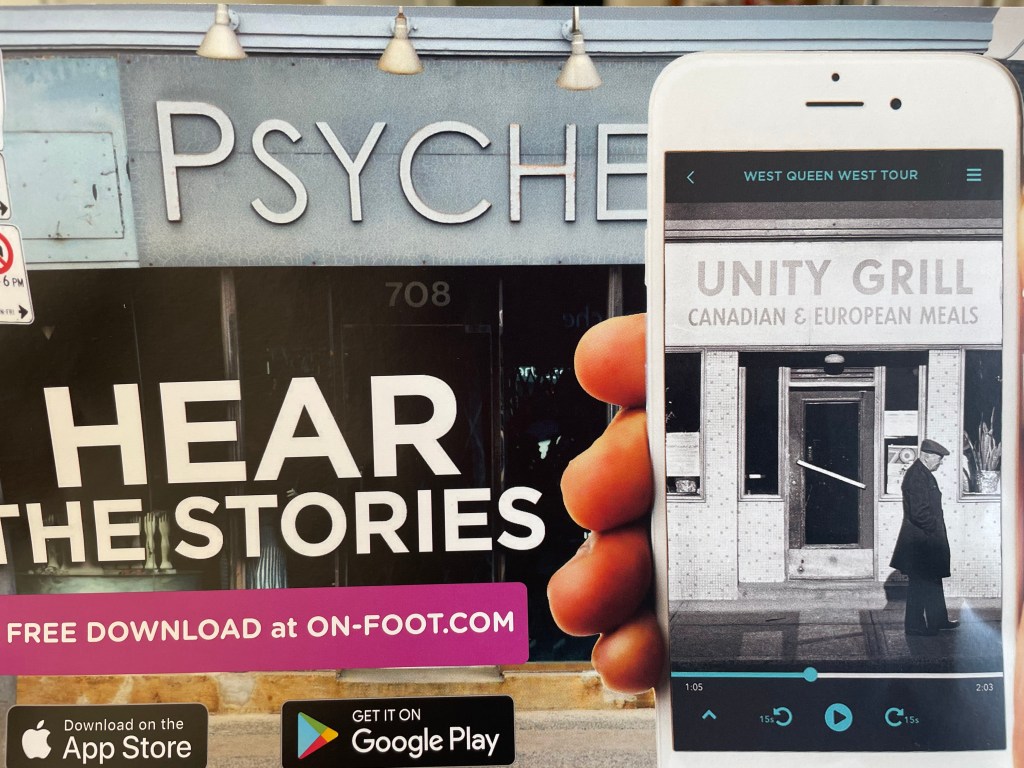
Beyond enhancing the physical classroom or library environment, GPS-enabled AR can be used to modify the physical environment. For example, students could use their devices on a community walk to load videos, holograms, soundscapes or other virtual enhancements to their surroundings that explain the history of the area, describe the area from different perspectives, tell stories of the place by community members, etc. This GPS-enabled AR technology is seen in photo below in Toronto, where an app has been created to offer walking tours of Toronto using interactive media. While I do not know of any such apps in French currently in Victoria, this could be something that students even contribute to creating in the future.
On-Foot Mobile App. Photo taken from Spacing: Toronto Urbanism Uncovered. 2021. #56.
Advantages of AR in the language learning library or classroom are outlined by Khoshnevisan and Le (n.d.) in their literature review on the subject. They include increased motivation, visual support, increased opportunities for interaction, and creating an authentic learning experience (Khoshenevisan and Le (n.d.). Motivation, authentic learning experiences and language scaffolding such as visual supports are integral to a successful language learning experience and if AR can help, it is worth learning more about.
Lastly, while AR offers opportunities for technology to enhance the physical world, another benefit to the language classroom is that it provides a real-world example and inspiration of what we see in science-fiction texts.
French graphic novels such as Roger et ses humains, in which Roger the robot is the main character who interacts with his human peers, as well as Voleurs d’espoir and Voleurs de mémoire, where characters can send their avatars into the network to explore and interact, play with ideas that are beyond our reach yet plausible given current technology.
Science fiction can inspire many important and fascinating discussions about technology, ethics, and philosophy that can support authentic and motivating conversations in a language classroom. AR in the classroom could inspire connections to reading and discussion themes in science-fiction literature or to ultimately imagining and creating their own science fiction stories.
Somme toute, I’m glad I donned the goggles and attempted a first dive into the waters of AR and VR. I turns out that much of AR has nothing to do with goggles at all, so I need not fear them! More importantly, it turns out AR is more aligned with foundational and innovative teaching practices, and that the potential of this technology to enhance learning in the language learning library and classroom make it worthy of a deep dive.
References
Green, Green and Brown (2017). Augmented reality in the K-12 Classroom. TechTrends (2017) 61:603–605.
I really enjoyed reading this article since it integrated so many aspects of transformations in education that are interrelated but not always seen as such. While all key points listed in the article were relevant, I found these three above connected well beyond simply computational thinking and technology to all aspects of learning. Making learning authentic is a cornerstone of successful language learning, and it was great to see this as one of the ten themes related to technology in education. Connecting learning opportunities to real-world problems in one’s community really help students to see the relevance of their learning. Approaches such as project-based learning work great for language learning, and it’s exciting to hear that these are also approaches that can be integrated with digital literacy. I also loved the idea that teachers will not be replaced- our roles are just evolving. This is echoed in innovative language teaching practices, where teachers are essential but must find creative ways to help kids become social agents in their own learning, and support them every step of the way as they develop new skills and the language that corresponds.
It was interesting looking at the key trends in Technology Adoption. While many of these trends are present and in progress in some schools, it really seems to depend on the school culture. If the school culture is less innovative, other elements such as redesigning learning and integrating digital literacy do not seem to be present. Having worked in many schools, it often feels like advancing cultures of innovation requires a critical mass of community members. This is likely why it is in the long-term category, as it takes time to change teaching approaches and school cultures.
As far as a five year horizon for my “Library Learning Commons”, I again would rather think of my current role as language coordinator. When I think of solvable challenges, I can see how I can support authentic learning experiences in French Immersion and Core French by continuing to build on the translated digital libraries. These help students connect authentically to francophone voices, identities, and perspectives through blogs, videos, interactive news sites, etc. I can also continue to support teacher and student use of apps and tools that support language learning, such as Flipgrid, voice and video recordings on the ipad, and others. Many language teachers think of innovative and authentic learning experiences for their students and simply need a hand with how best to integrate language learning. I hope to support teachers in this way.
While I am interested in supporting computational thinking in French, I see this as more difficult partly due to my comfort with it. That said, I have many ideas for how to support the language component of ADST, so perhaps it will be achievable, especially if I partner with TLs and teachers who are more experienced with computation thinking but may be keen to have added language support.
Lastly, I do not see sustaining innovation through leadership changes as a wicked challenge personally. I have worked in many schools where leadership has changed. As long as the school community as a whole adopts a growth mindset and openness to innovative practices, they can weather changes in administration. I can support French Immersion school communities in this way by finding ways to further support teacher collaboration. This will ensure that schools can continue to innovate despite leadership changes.
If you are a TL, how might someone in my role better support your LLC with Technology Adaptation, specifically as it relates to Core French or French Immersion?
If you are a teacher, what supports would you like to see from someone in my role or another curriculum support role at the district to help you and your school community move towards a culture of innovation?
Sources
Freeman, A., Adams Becker, S., Cummins, M., Davis, A., and Hall Giesinger, C. (2017). NMC/CoSN Horizon Report: 2017 K–12 Edition. Austin, Texas: The New Media Consortium.
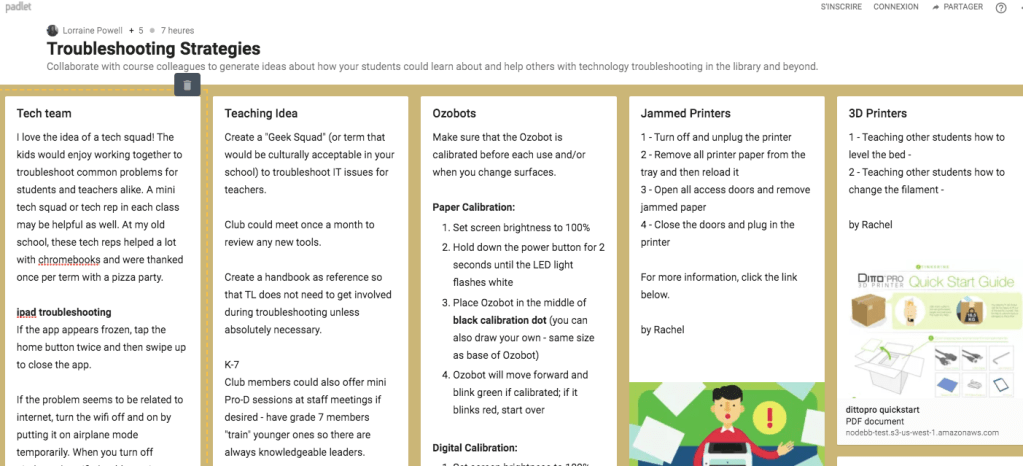
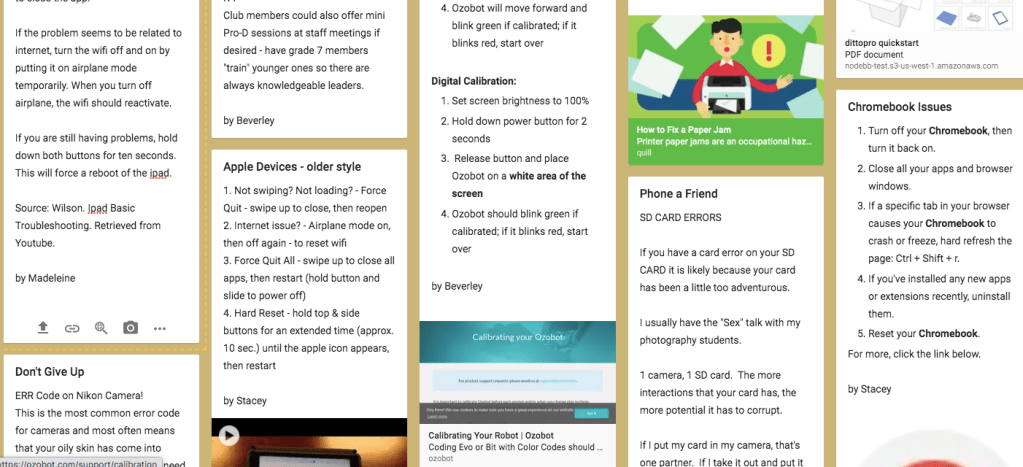
Before I watched the videos and participated in the collaborative padlet, my first troubleshooting strategy I thought of was « turn off the computer and turn it back on! ». I laughed at how basic this is and at how often I and others use this as our first line of troubleshooting.
Finally I was going to learn how the pros troubleshoot, I thought…..I was therefore surprised to learn from the ipad video as well as from the padlet contributions that much of tech troubleshooting does in fact involve first closing down and reopening programs, apps, and devices.
I think any school that uses ipads should consider watching the two-minute video with students to go over basic ways to troubleshoot. What I have noticed with kids is that they can get forceful with buttons and it would be helpful to show everyone how to solve the vast majority of ipad issues.
I also really liked Beverley’s suggestion of having a tech squad at the school. More than simply contributing to solving tech issues, this group could be mentored to learn many new skills while also forming a community of students with similar interests. I can see this being a great club for a TL or school tech leader to oversee.
Lastly, I found Stacey’s suggestions for chromebooks helpful since our schools use chromebooks in classes. Again, many initial troubleshooting strategies such as closing apps are fairly basic and should be taught directly to students.
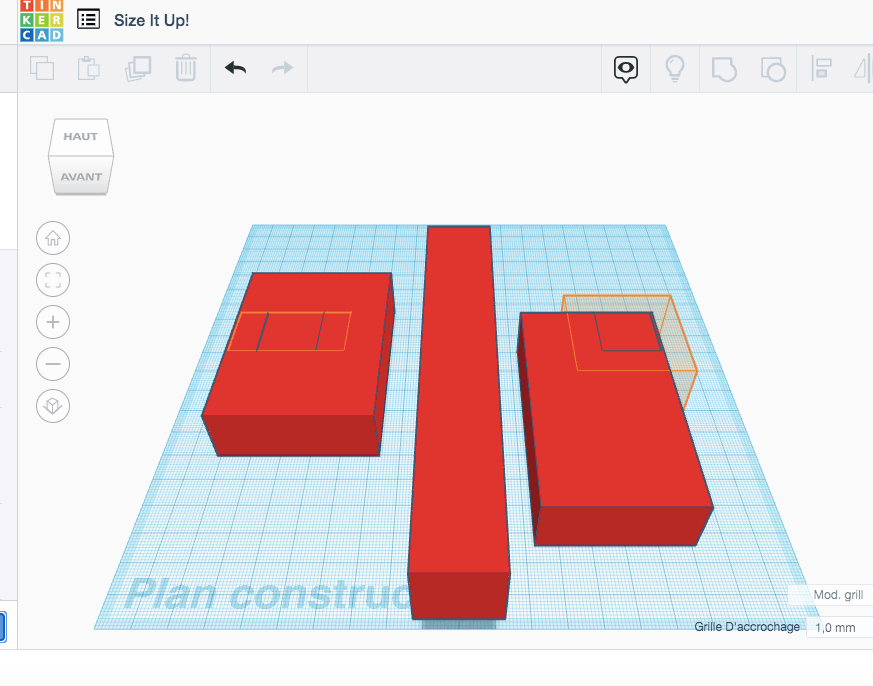
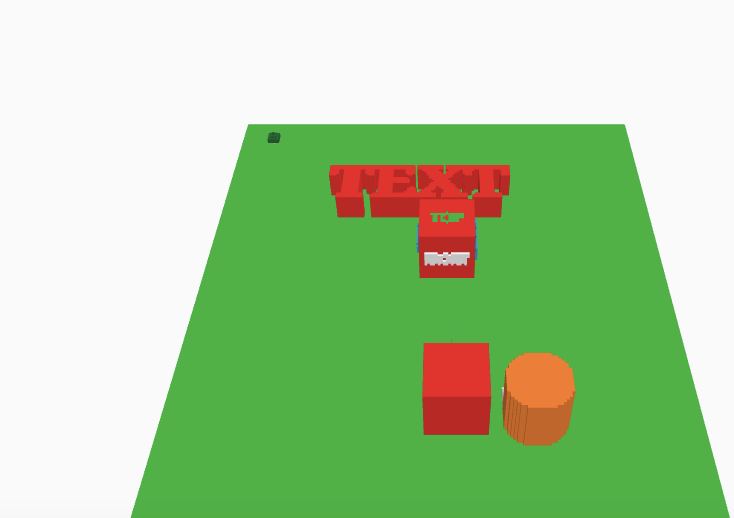
Since Tinkercad is brand new to me, I went through a bunch of the tutorials to learn how to place shapes, extend them, rotate, move them. It was fun to play with, but when I changed the setting to Lego I was struck with a longing to simply create using Lego. I’m sure once I get more used to the program I will appreciate the possibilities offered by this program. I can see students enjoying creating a prototype for a design project using Tinkercad. When I did my Imaginer l’avenir project on sustainable designs, many students would have enjoyed the chance to integrate technology and this could have been a great way to explore new designs for those kids.
In the tutorial above, I learned how to extend objects vertically and horizontally. In the tutorial below, I learned how to place objects and rotate the view.
While I consider myself at the very beginning of understanding computational thinking as it relates to coding and computer applications, this quote emphasized to me the importance that many educators accord to these thinking skills. By comparing reading code to reading text, and understanding the world, the author makes a case for its inclusion as an essential part of digital literacy that students will need to face the world.
The concept of computational participation aligns with socio-constructivism, a theoretical framework that helps me and many educators to understand how students learn and build on each others’ ideas through learning experiences and mediated interaction. As I mentioned earlier, I do not see the value of a students independently whiling away the hours on Scratch with no explicit skills being taught. However, the idea of kids working together on coding problems and sharing codes collaboratively to build off each others’ ideas demonstrates the power of collaboration and participation. We see collaborative problem solving in so many contexts in school, from group or paired inquiry projects to group problem solving in Math.
Computational participation involves the application of computational thinking to solving real world problems or to create. I have seen this in action through group projects where students used coding to create video games to allow their peers to play. Students put together an arcade and invited their peers to come play. They also designed arcade game boxes to go around their computers to give the event an authentic feeling. It was clear that the students were very proud of and motivated by this project, and keen to share their learning.
Again, I find it hard to write a reflection on a part of the curriculum that is so new to me, but I feel that computational participation better integrates other core competencies such as critical thinking, communication, and creativity. As such I can imagine it being applied to many contexts and leading to students developing a range of skills beyond computational thinking.
Just like all forms of literacy and thinking skills, skills related to computational participation need to be explicitly taught and scaffolded into lessons and projects. How do you foresee teaching computational participation? What specific skills do you see as essential to moving from computational thinking to computational participation?




 Technology in the language learning classroom and library